
Security-first release: this update delivers a broad set of security improvements with a strong focus on TLS, while maintaining usability. Certificate management was improved, making it easy for administrators to generate appliance certificates, upload existing ones, or trust private CAs. The improved workflow secures secret sharing endpoints and enables TLS-protected DNS and LDAP connections, so organizations get stronger transport security without added friction for admins or end users.
Highlights of frXOS-2.11.0
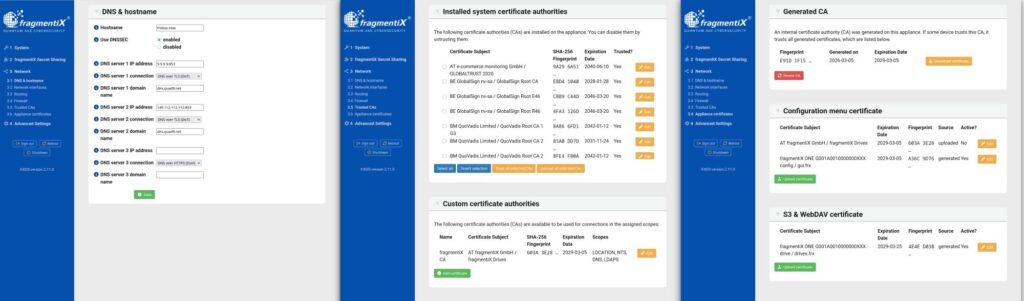
Certificate manager
We’ve added two new menu items in the GUI to make TLS certificate management simple and clear.
The fragmentiX Appliance uses TLS certificates in two ways:
- to securely connect to external servers (<Menu item XX> Trusted CAs), and
- to provide TLS-secured access to the GUI and network drives (<Menu item XX> Appliance certificates).
Trusted CAs
Whenever the fragmentiX Appliance connects to an external server (for example, to an S3 storage LOCATION for secret sharing or a DNS server), it verifies the server’s TLS certificate. Certificates are validated against trusted Certificate Authorities (CAs) which are pre-installed in the fragmentiX appliance.
All system CA certificates are listed in the GUI; you can remove trust for any CA that you do not trust or do not need to verify server connections. If you use a private CA to sign a server certificate that the appliance shall trust, upload the CA certificate so the appliance can verify the server certificate and establish a trusted connection.
Appliance certificates
The fragmentiX Appliance needs server certificates and private keys to secure the configuration GUI and user access to Network drives (WebDAV or S3). By default, an internal CA and two certificates signed by this CA (one for the GUI and one for Network drives) are available on each appliance; installing the internal CA on client machines enables trusted connections. Alternatively, administrators can upload their own certificates and private keys—useful for organizations that already trust an internal CA and prefer issuing dedicated certificates without distributing a new CA.
Secure Domain Name System (DNS) configuration
These options improve both the privacy and trustworthiness of DNS lookups.
This update adds an option to enable DNSSEC for all configured DNS servers, guaranteeing DNS response authenticity. You can configure up to three DNS servers and choose the protocol per server:
- DoT — DNS over TLS (default): uses TLS certificates to encrypt traffic between resolver and server.
- DoH — DNS over HTTPS: leverages HTTPS to provide DNS resolution over an encrypted channel.
- DoQ — DNS over QUIC: uses the QUIC protocol transport for encrypted DNS (further reading).
- Unencrypted — Plain DNS requests via UDP.
For any encrypted DNS protocol, enter the server’s hostname (TLS server name) in addition to its IP address so the name can be validated against the TLS certificate. These options let you securely use public DNS servers or your own on‑premises DNS server with TLS.
Why secure DNS matters
Secure DNS (DoT/DoH/DoQ) encrypts DNS queries to prevent eavesdropping and tampering on the network, while DNSSEC verifies DNS responses cryptographically to stop attackers from spoofing or redirecting users.
Together they protect privacy, prevent man-in-the-middle and cache-poisoning attacks, and ensure users reach authentic, authentic DNS services.
Further reading: Cloudflare’s guide to DNS encryption
Full Release Notes frXOS-2.11.0
- Release date 2026-03-26
Security Updates
- Support for secure DNS resolution (DoT, DoH, DoQ, DNSSEC)
- Improved WebDAV interface
- Operating system security updates and hardening
General improvements
- Refactor TLS certificate management/configuration
- Allow (and default to) LDAPS (LDAP via TLS) configuration
- Improved logging
Bugfixes
- Text improvements
Update your appliance now
Staying up-to-date is crucial to maximizing the performance and security of your devices!
If you’re a fragmentiX Appliance owner, we recommend installing the latest update as soon as possible!
▶️ If you encounter any issues, don’t hesitate to reach out to our support team.
▶️ Not a fragmentiX Appliance user yet? Explore our products page to learn more about how you can benefit from our solutions.

 EN
EN  DE
DE  FR
FR  IT
IT  ES
ES  PT
PT
0 Comments